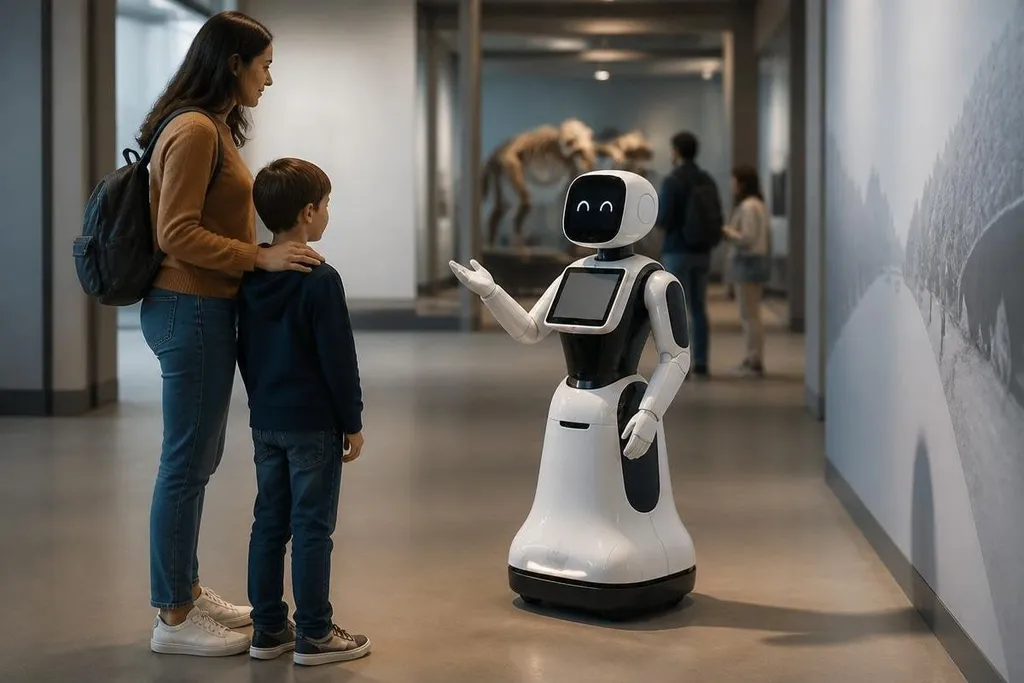
An entertainment robot may greet visitors, perform on a stage, guide people through an exhibit, or react to spoken commands. Those jobs can make a venue easier to use, but they also put moving hardware close to people who may not know its limits.
The useful question is simple: does the robot improve the experience enough to justify its cost, upkeep, and safety controls?
Quick read
- Robots can repeat a performance or greeting without tiring
- Sensors and remote control help staff manage live interactions
- A public robot needs clear limits, trained operators, and a stop plan
Where entertainment robots help
Entertainment robots give venues a physical way to present information or perform a routine. A museum robot can point visitors toward an exhibit, while a stage robot can repeat timed movements during several shows. The benefit comes from repeatable motion and scripted behavior.
That repeatability can help staff. A robot can handle a fixed greeting or demonstration while people focus on questions, crowd flow, ticket checks, or maintenance. The split works when the robot stays within a narrow task and a person remains close enough to step in.
Robots can also make an exhibit easier to notice. Movement, lights, sound, and a response to a visitor's action can draw attention to a subject that may otherwise be missed. The effect depends on the setting: a crowded event needs different motion and sound limits than a quiet gallery.
Those limits matter most once a visitor enters the robot’s working space. Reports on entertainment robots from Robot24.com can place claims about public machines beside named systems and dated tests before the discussion turns to people nearby.
The risks start with people nearby
A public venue changes the job. Visitors may stand too close, reach toward a moving arm, block a sensor, or ask the robot to do something outside its script. Children may act unpredictably, while crowds can make it harder for an operator to see the robot's full path.
A robot that uses wheels, joints, or a moving head needs a clear operating area. The venue must mark that area, check it during the day, and decide what happens when someone enters it.
A camera or proximity sensor can help, but no sensor removes the need for staff. Privacy creates a second concern because a robot may use cameras or microphones to respond to visitors. That can affect how the venue handles recordings, signs, access to stored data, and requests from people who don't want to take part. The controls should match the task. A greeting robot may need less data than a system that tracks movement through a full exhibit.
The robot can also fail in ways that affect trust. It may stop during a show, misunderstand a request, lose its network connection, or move in a way that feels unsafe. Staff need a manual stop, a safe restart process, and a clear way to tell visitors what happened.
Cost goes beyond the purchase price
The hardware is one part of the bill. A venue may also need floor changes, power, network access, software updates, spare parts, operator training, insurance review, and time for daily checks.
Controlled settings suit entertainment robots best. A scripted show with fixed marks is easier to manage than an open floor where people can approach from any direction. Each extra behavior adds testing work, especially when speech, vision, motion, and remote control interact.
I’d choose a robot with fewer actions and clear controls over one that promises a long list of tricks.
That choice may limit the first demonstration, but it gives staff fewer failure modes to watch. It also makes training easier and lets the venue measure whether the robot helps with a real task instead of adding another attraction to maintain.
A practical decision guide
Before buying or renting an entertainment robot, check these points:
- Define the task in one sentence, such as greeting, guiding, or performing a fixed routine.
- Mark the robot's operating area and test it with the expected crowd size.
- Set a person-free stop method that staff can reach without entering the robot's path.
- List every camera, microphone, recording function, and network connection.
- Price staff time, repairs, training, storage, and software support beside the hardware.
- Run a limited trial and record stops, visitor complaints, operator actions, and missed tasks.
The trial should answer a practical question: does the robot reduce staff work or create another job? If operators spend the whole session correcting motion, clearing space, or explaining failures, the venue may need a simpler setup.
These robots have a place where their actions are easy to control and their purpose is clear. The next purchase decision should rest on the stop procedure, daily workload, and measured visitor response, not on how many features appear in the demonstration.